📖 Booklet Maker
Turn a PDF into a booklet you can print double-sided, fold in half and staple — or an 8-page mini zine from a single sheet.
Choose a PDF or drop it here
Stays on your device — nothing is uploaded
1 · Your PDF
No file yet. Tip: make the pages in any app (Word, Canva, Google Docs) and save as PDF.
2 · Layout
3 · Print
How to print and fold
How booklet page order works
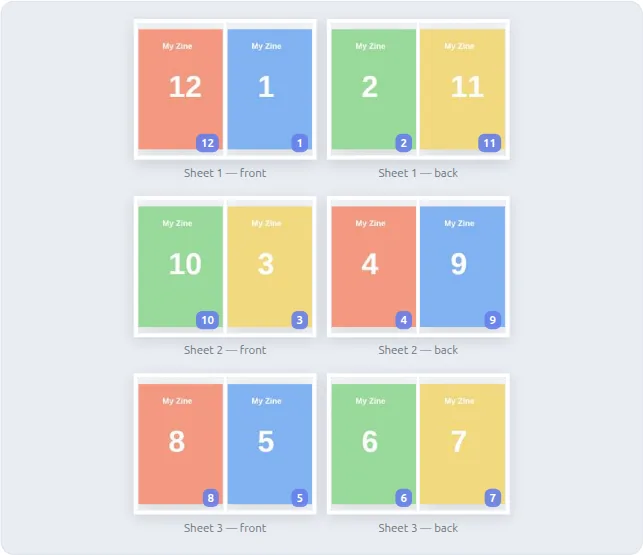
When sheets are folded in half and stacked, page 1 ends up next to the last page. For an 8-page booklet on two sheets the order is:
| Sheet | Front side (left | right) | Back side (left | right) |
|---|---|---|
| 1 | 8 | 1 | 2 | 7 |
| 2 | 6 | 3 | 4 | 5 |
This tool works out that order for any length, adds blank pages to reach a multiple of four, and scales your pages to fit.
Booklet sizes
| Sheet | Booklet page size |
|---|---|
| A4 | A5 (148 × 210 mm) |
| A3 | A4 (210 × 297 mm) |
| US Letter | 5½ × 8½ in |
| Tabloid | 8½ × 11 in |
| US Legal | 7 × 8½ in |
About the Booklet Maker
🔀 Pages in the right order
Booklets need their pages shuffled — page 1 next to the last page, page 2 next to the second-last, and so on. This tool does the shuffle so the booklet reads in order once folded.
📄 Blank pages filled in
A folded booklet needs a multiple of four pages. Missing pages are added as blanks, before the back cover so your back page stays on the back.
🖨️ Any printer
With a double-sided printer it's one print job. Without one, print the fronts, flip the stack, and print the backs.
📰 Mini zines
The classic 8-page zine: one sheet, one cut, a few folds. Pages are rotated so they all end up the right way up.
🔒 Private
The PDF is read and rearranged in your browser. It never leaves your device.
💡 Great for
Programmes, recipe books, newsletters, instruction manuals, comics, wedding orders of service and school projects.
Frequently Asked Questions
How do I print a PDF as a booklet?
Choose your PDF, keep "Folded booklet" selected and download the print-ready file. Print it double-sided with flip on short edge at actual size, stack the sheets in order, fold the stack in half and staple along the fold.
Why does my booklet have blank pages?
Each folded sheet makes four pages, so the total has to be a multiple of four. A 10-page PDF becomes a 12-page booklet with two blank pages, placed before the back cover.
What size will the booklet be?
Half the sheet. A4 sheets make an A5 booklet, A3 makes A4, and US Letter makes a 5½ × 8½ inch booklet. Your pages are scaled to fit.
How do I fold an 8-page mini zine?
- Print the single page.
- Fold it in half lengthwise, then widthwise, then widthwise again, and unfold.
- Cut along the marked centre line through the middle of the folded sheet.
- Fold lengthwise, push the ends together so the slit opens into a diamond, and flatten it into a little book.
My printer only prints one side — can I still make a booklet?
Yes. Choose "One side only". The PDF has all the front sides first and then all the back sides; print the fronts, put the stack back in the tray (turned over as your printer needs), and print the backs.
How do I print a booklet from a PDF?
Load your PDF, keep “Folded booklet” selected and download the print-ready file. Print it double-sided with flip on short edge, fold the stack in half and staple along the fold.
What is a mini zine?
A tiny 8-page booklet made from a single sheet with one cut and a few folds. Choose “Mini zine” and the tool places your first eight pages so they all come out the right way up.